Field Team Productivity

Routing in the Mobile App

Create optimal routes for yourself and your team. Navigate, check in and out, log activities and data—all in one place.

Mapsly’s mobile app offers a convenient way to plan and follow your daily routes; check in to locations and collect various data and photos; add locations to your current route on the go; discover nearby prospects; export route points as calendar meetings; and record your travel for cost reimbursement.

The mobile app offers all Mapsly features available in the web app. For the full list of Mapsly’s routing features, see the Routing Overview.

Easily Plan Optimal Routes

Add CRM records or spreadsheet rows to the Route panel using the map lasso tool or by clicking Add to route in a record’s popup, detailed view panel, or Table view; check Optimize and press Build—and Mapsly will create a route by reshuffling your locations in the most optimal order based on live and historical traffic.

Adjust the start location and departure time, if necessary. Plan for multiple days ahead.

Learn more about routing in Mapsly

Fill In Available Time between Your Meetings

Check Add calendar events before pressing Build—and Mapsly will automatically plan new visits while filling in free time “around” your existing meetings in the most optimal order based on their locations. Mapsly supports your CRM calendar, Google Calendar, and Outlook Calendar.

You can also drop CRM records or spreadsheet rows directly into the calendar view and press Optimize.

Learn more about the Travel-Aware Calendar

See Forecast Arrival Time and Navigate to Locations

Press Go to switch to Trip mode, and Mapsly will display the forecast arrival time at all unvisited locations and how early or late you’re arriving. Navigate to a location using your favorite navigation app, like Waze, Google Maps, or Apple Maps.

Check In to Locations

Press Check In to log your visit to your CRM or spreadsheet and gather necessary data. Check-in forms are easily customizable and save data directly to your CRM or spreadsheet immediately upon submission. Photos and e-signatures can also be saved to your CRM as attachments.

Learn more about check-ins in Mapsly

Learn more about visit scripting (the concept)

Add Locations to Your Route on the Go

At any moment, use the lasso tool or Add to route to add more locations to your current route, press Re-optimize to reshuffle unvisited locations in the optimal order based on your current location, and press Go to continue your route.

Discover Nearby Prospects

Search nearby businesses and add them to your CRM in two clicks, or perform a full check-in—and Mapsly will create a new CRM contact or account and log a visit to it with data from your check-in form.

Export Route Locations to Your Calendar

Press Export to calendar to create calendar events with your route locations. Travel times and distances between events will also appear in the calendar view.

Learn more about the Travel-Aware Calendar

Adjust Your Working Hours and Other Preferences

Set up your working days and hours, breaks, travel mode (car, truck, scooter), default start and finish locations, and default meeting length.

If necessary, add exceptions to customize your working schedule for specific periods like vacations, sick leaves, or temporary schedules.

Configure Offline Mode

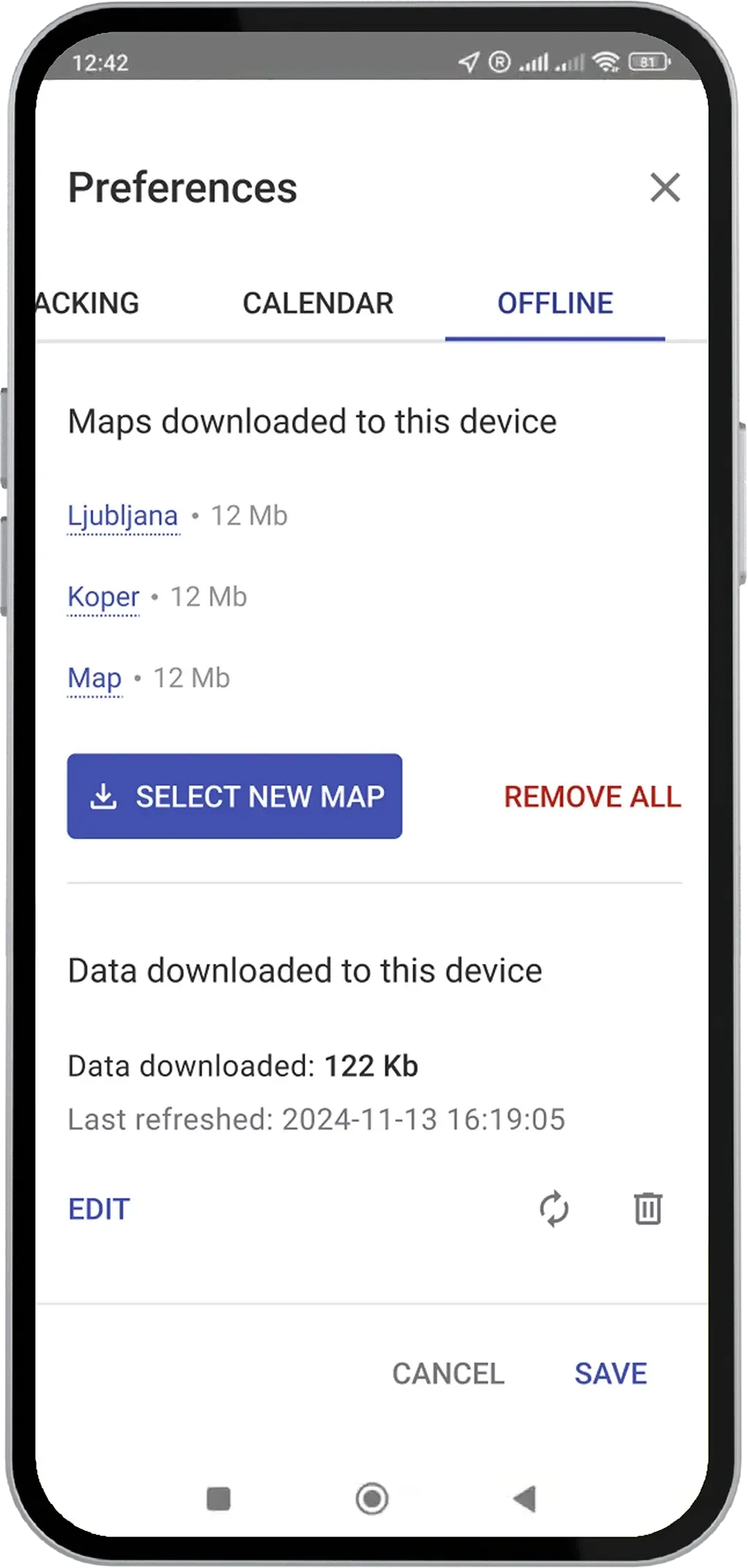
Download offline maps and select objects to cache, so you can continue working without an internet connection.

Mapsly mobile app preferences, Offline tab: maps downloaded to the device and cached data with the last refresh time

Save Frequent Locations

Add addresses that you frequently visit to Saved places. Select a saved place when planning your route.

Clone Routes

To repeat a previous route, simply clone it, select the target date, and press Save. Then press Go if you’d like to start this route right now.

Customer story

How Tekmetric Empowers Its Field Sales Team with Mapsly

Learn how Tekmetric uses Mapsly’s route optimization, prospecting, and data cleansing tools to grow in-person sales outreach and better serve automotive repair shops.

Read the story

Ready to Get Started?

Start a free 14-day trial of the full platform, or let a solution engineer build a proof of concept for your team.

No credit card required · Chat with sales