Mapsly Analytics

Mapsly Analytics

Powerful & intuitive business intelligence platform with drag-n-drop dashboards and 40+ chart types

Key Features

Mapsly Analytics is loaded with advanced features enabling users of all skill sets to explore and visualize their data.

  • Drag-n-Drop Dashboards

    Build your charts and complex beautiful dashboards in minutes using drag-n-drop visual builder

  • 40+ Chart Types

    Explore a selection of 40+ charts ranging from simple pie and line charts to complex geospatial and funnel charts

  • Advanced Filtering

    Combine chart-specific with dashboard-level cross filters and variables to create connected charts

  • Drill-By & Drill-to-Detail

    Easily switch between different levels of data aggregation and quickly access underlying data records

  • Custom Columns & Datasets

    Add custom columns based on SQL-expressions to your datasets. Pre-aggregate your data from one or multiple data sources in virtual datasets.

  • Direct SQL Access

    Access your data tables across all your data sources directly using SQL queries

All Your Data, No Extra Integration

All your Mapsly data, including route activities, check-in data, your CRM data (including custom objects and custom fields), Google Sheets and data pushed to Mapsly via the Mapsly API or Zapier, is immediately available in Mapsly Analytics without the need for any extra integration or data mapping.

Analytics for Field Sales & Service Teams

Mapsly Analytics comes with two pre-configured dashboards providing a 360º-view of your field sales and service team’s activity and performance. You can edit existing and add new charts to these dashboards to address your custom requirements for analytics. And since your CRM data is pre-loaded into Mapsly Analytics, you can easily combine it with Mapsly’s routing data for deeper insights. Learn more in Mapsly Help Center.

Routing — Overview

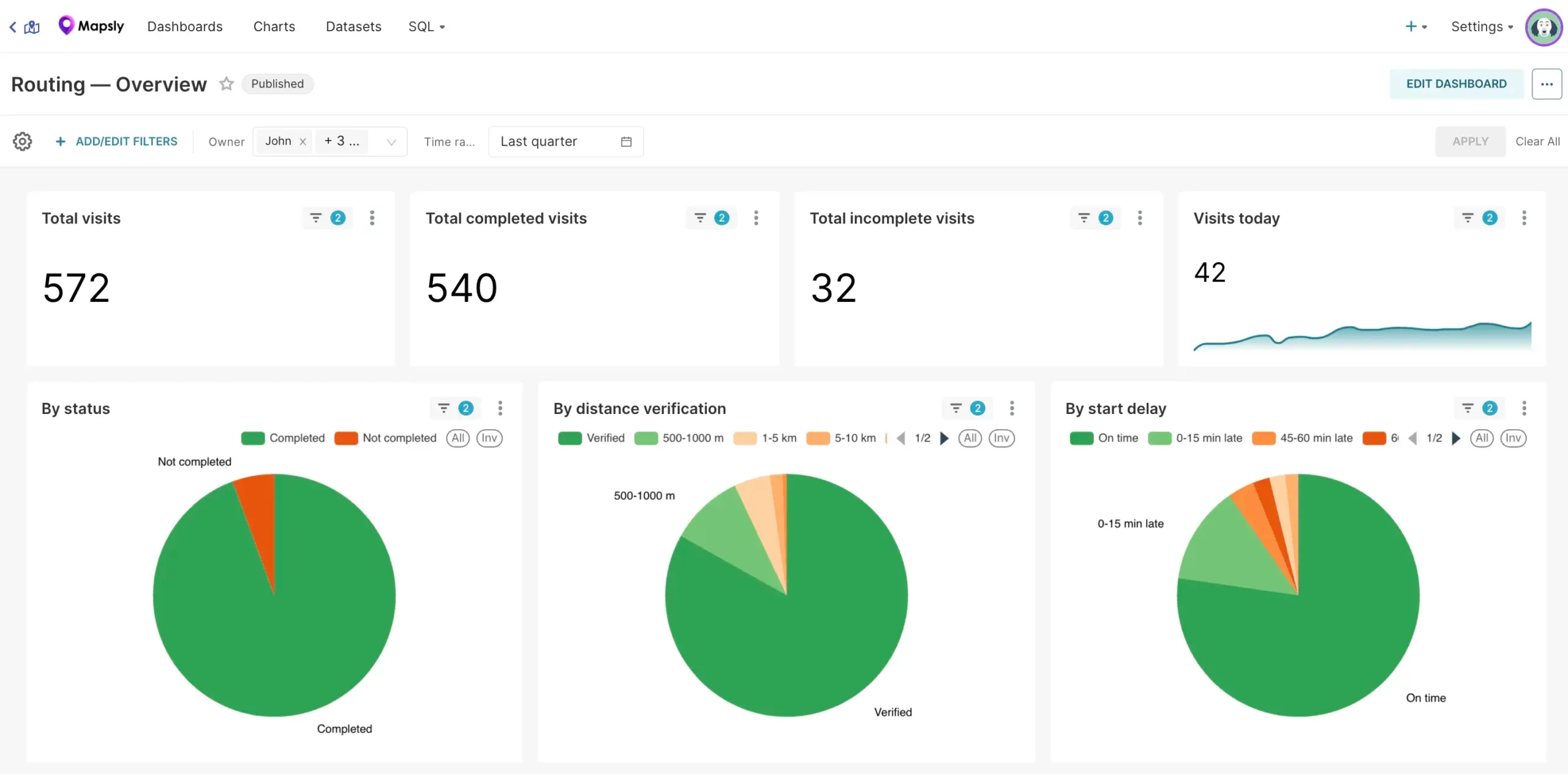
Routing — Overview dashboard in Mapsly Analytics with total, completed, and incomplete visits and pie charts by status, distance verification, and start delay

In its Visits section:

  • Total planned visits, broken down to Total completed visits and Total failed visits;
  • Visits today with a trendline showing the number of visits per day over the period;
  • Total visits by status (such as completed, failed, and your custom route activity statuses);
  • Total completed visits by start delay: started on time, started with a delay of up to 15 minutes, started with a delay of 15-30 minutes, …, started more than 1 hour late;
  • Total completed by user’s distance from location: user is at the location (distance within 500m), user is 500-1000 meters from the location, …, user is more than 5 km from the location.
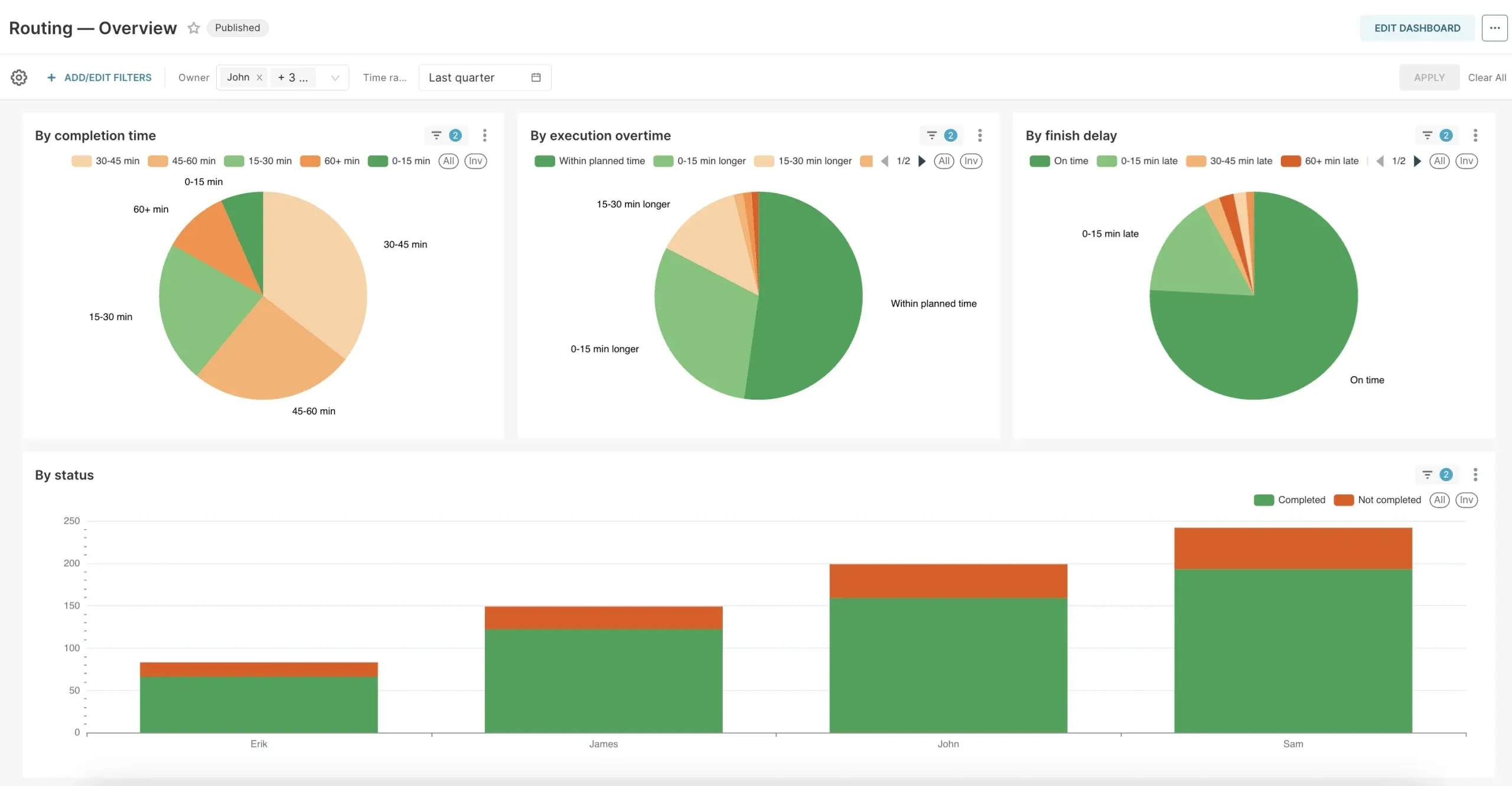
Routing — Overview dashboard in Mapsly Analytics with charts by completion time, execution overtime, and finish delay, and visits by status per user

Its Routes section compares the planned distance and time, based on the user’s daily routes, against the traveled distance and time logged using Mapsly’s location tracking and shows the total planned distance and time broken down into components: travel time, waiting time, and visit time.

The same information is also shown for each user, along with the number of days each user traveled over the specified period of days.

Routing — Time Analysis

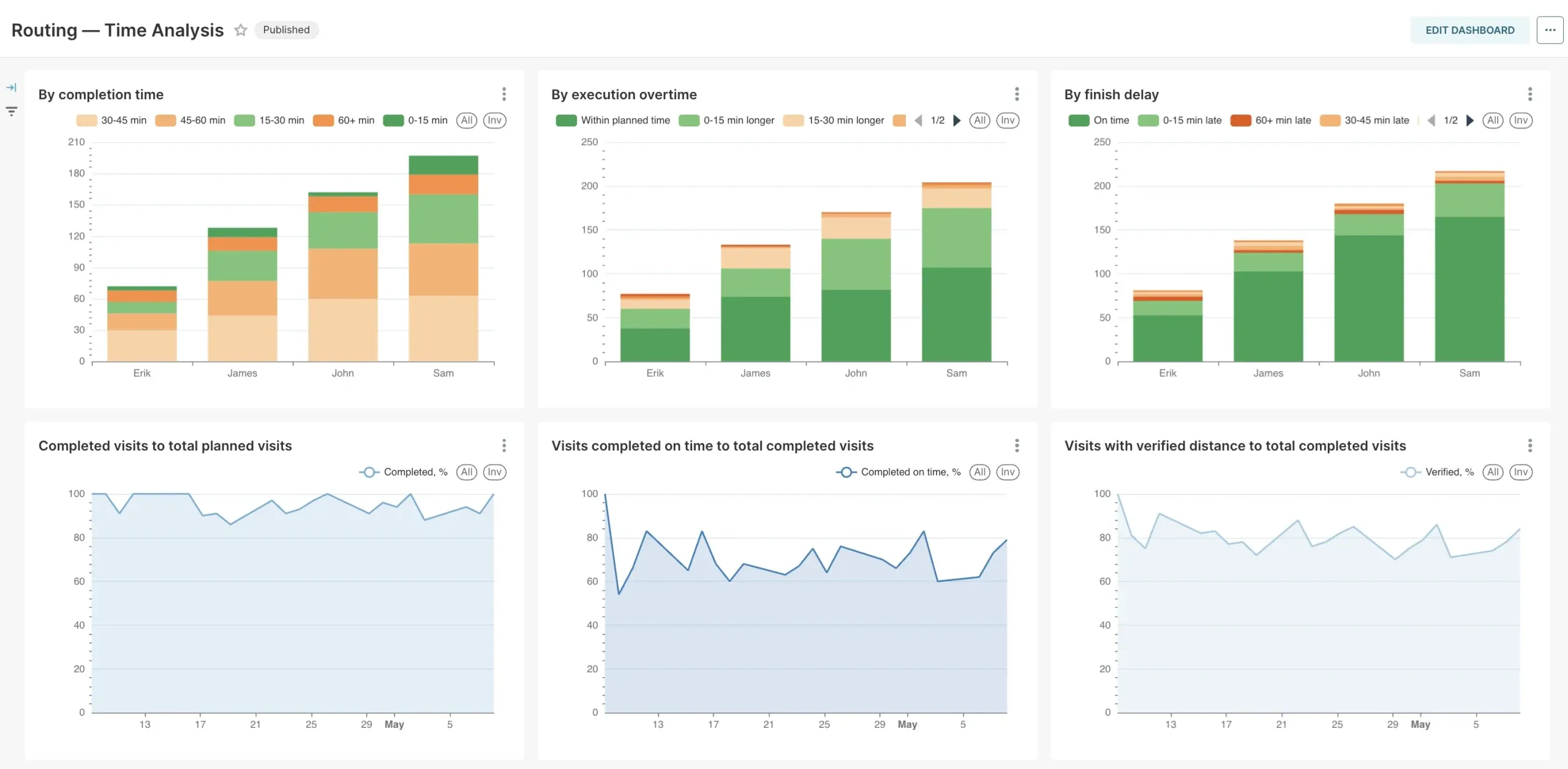
Routing — Time Analysis dashboard in Mapsly Analytics showing per-user visit metrics and trend lines over time

This dashboard demonstrates how the above mentioned metrics change over the specified time period (e.g., over 6 months) with the specified time grain (e.g., one week), for the selected users — combined and for each user separately.

Mapsly Analytics Pricing

Mapsly Analytics is available as an add-on on all Mapsly plans and is priced per user, with separate prices for people who build dashboards and people who only view them. See current prices.

Customer story

How Tekmetric Empowers Its Field Sales Team With Mapsly

Learn how Tekmetric uses Mapsly’s route optimization, prospecting, and data cleansing tools to grow in-person sales outreach and better serve automotive repair shops.

Read the story

Ready to Get Started?

Start a free 14-day trial of the full platform, or let a solution engineer build a proof of concept for your team.

No credit card required · Chat with sales